Custom Workflows: a visual canvas for assistant logic
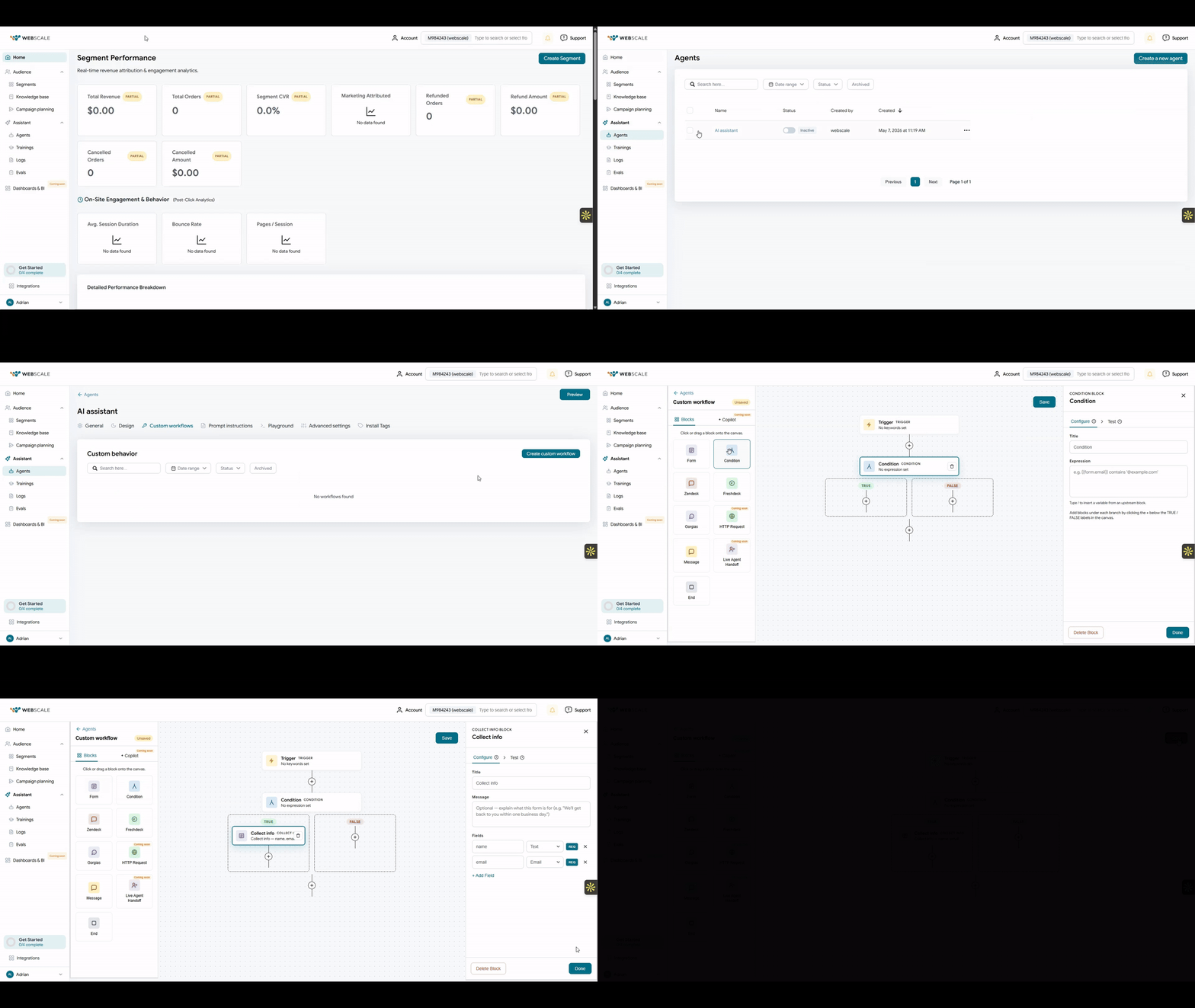
Set branching conditions with drag-and-drop blocks inside the AI Shopping Assistant. Activate when ready. No code.
A keyword match triggers the workflow. It holds state across turns and picks up exactly where it left off if the shopper steps away. The blocks cover the work: Form, Condition, Message, HTTP Request, Live Agent Handoff, and ticket creation for Zendesk and Freshdesk.
Workflows are draft-first, so a flow only activates when you hit Activate. Every save creates a restorable snapshot. You can archive a workflow without deleting it, and a permanent delete still keeps the audit history. The core build is complete and now rolling out on customer sites, with an early-customer feedback cycle underway.
What teams are building
Return & refund flow
Trigger: “return,” “refund,” “exchange” → Form collects order number and reason → HTTP Request validates against your OMS → Condition checks the return window → Message confirms eligibility or routes to a Zendesk ticket.
High-value cart recovery
Trigger: “discount,” “coupon,” “promo” → Condition checks cart value via HTTP Request → above threshold, Message delivers a one-time code → below threshold, Message suggests bundle upgrades to reach free shipping.
Drag-and-drop blocks
Form, Condition, Message, HTTP Request, Live Agent Handoff, and Zendesk or Freshdesk tickets. Build the path visually.
Holds state across turns
A keyword triggers the flow. It holds state across the conversation and resumes where it left off.
Draft-first and versioned
Activate when you are ready. Every save is a restorable snapshot. Archive without deleting, and audit history survives a delete.
Drag-and-drop blocks
Form, Condition, Message, HTTP Request, Live Agent Handoff, and Zendesk or Freshdesk tickets. Build the path visually.
Holds state across turns
A keyword triggers the flow. It holds state across the conversation and resumes where it left off.
Draft-first and versioned
Activate when you are ready. Every save is a restorable snapshot. Archive without deleting, and audit history survives a delete.
Custom Workflows in the AI Shopping Assistant
Platform Updates
Product AI Enhance Pipeline
Catalog enrichment used to be a manual job you ran every so often. Now it runs on its own. This new DAG handles embeddings and taxonomy mapping across the whole catalog. Embedding generation runs 3x faster. The Merchant Taxonomy Overhaul ships alongside it: a leaner schema and faster personalized discovery lookups, with a smaller storage footprint. This is the data foundation the rest of the AI layer depends on.
Freshdesk Connector
Freshdesk now connects end to end. Link an account and route support workflows with full webhook support. Tickets and agents sync automatically. Setup is simpler than it was at launch, since Group ID is now optional and parameter naming is standardized across the API. If you use the Freshdesk handoff block in Custom Workflows, this is the other half of that loop.
Q&A regeneration
Update a product and you no longer need a full re-run. Your FAQ and Q&A agents can now regenerate answers on demand, with richer prompt tuning. Trigger it for a single product or a whole category as your catalog changes. It pairs naturally with the Product AI Enhance Pipeline above.
Developer & Ops Corner
Stats API expansion and new runbooks. New tooling for the engineers and ops leads who instrument the platform: a programmatic audit layer, plus the runbooks to operate it.
Stats API
New endpoints + Postman collections
GET
/v1/stats/conversations
Session and message volume
GET
/v1/stats/workflows
Workflow trigger and completion rates
GET
/v1/stats/search
Search query performance
The Stats API picks up new endpoints and Postman collections for deeper visibility into platform activity. Operators get a programmatic audit layer to query directly. The data you observe is accurate.
Stats API expanded
New endpoints and Postman collections. A programmatic audit layer for platform activity.
Snippet download to S3
Dataset folders can now export snippets directly to your S3 bucket, useful for teams piping training data or content into external pipelines.
Backfill runbook
Detailed operations documentation for scheduling and managing catalog enrichment runs is now available in the developer docs.
New endpoints and Postman collections. A programmatic audit layer for platform activity.
Snippet download to S3
Dataset folders can now export snippets directly to your S3 bucket, useful for teams piping training data or content into external pipelines.
Backfill runbook
Detailed operations documentation for scheduling and managing catalog enrichment runs is now available in the developer docs.
Reliability Notes
Bug Fix
Workflow state consistency
Workflow states now stay consistent across create, update, patch, and delete operations. Enabled and disabled states follow the same rules.
Quality of Life
Cancel flow improvements
Canceling or resetting mid-conversation is smoother now across shopping, RAG, Q&A and customer support agents. Session recovery is a real production pain point, and this is one your shoppers will feel without being told to look.
Polish
Smarter member search
More relevant results, fewer keystrokes.
Quick Reference
Your monthly agent health review
✓
Review draft workflows and activate anything ready to go live
✓
Regenerate Q&A for product lines you updated this month
✓
Verify Freshdesk connector credentials and webhook routing
✓
Pull Stats API dashboards and compare against last month
✓
Audit user roles and access now that Custom Workflows is live
✓
Confirm the Airflow backfill runbook is scheduled for catalog refreshes due this sprint
Do this before the sprint closes, not after a merchant files a support ticket.
From the Blog
AI Shopping Assistant
~7 min read
93%
of purchases start with a search
1 in 10
shoppers finds what they want
Why keyword search is failing your shoppers
Adrian walks through the four ways keyword search structurally fails, and why adding an AI layer on top does not fix the underlying model. Worth a read before your next catalog enrichment run.